
What Is HTTP?

HTTP or Hypertext Transfer Protocol is a set of rules that web browsers and servers follow in order to exchange information. HTTP is a TCP/IP-based protocol and is suitable for the transmission of text as well as multimedia elements like audio, video, images, and others. Communication through HTTP occurs in the Application Layer on Port 80.
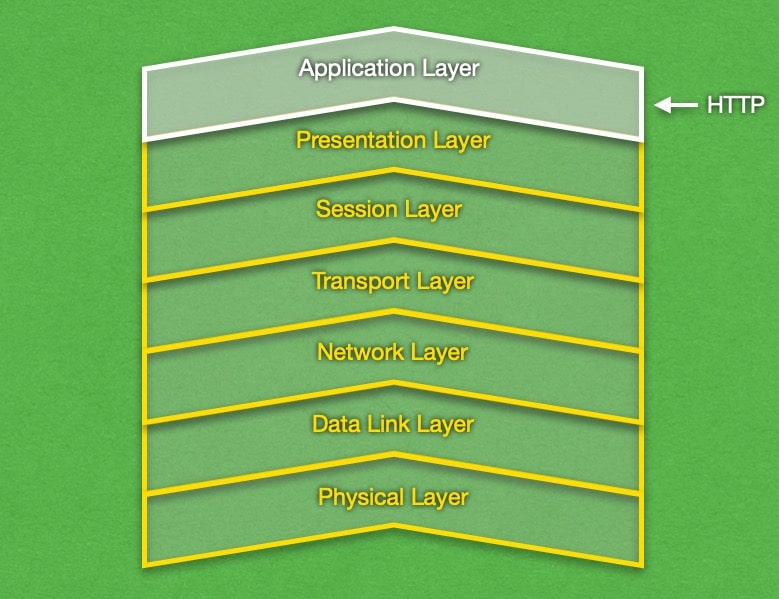
HTTP operates in the Application networking layer.

The main issue with HTTP is that it focuses only on the successful delivery of the information and does not incorporate any protections against eavesdropping or tampering. Due to this reason, HTTP is considered to be an unsecure protocol.

In order to access any website or embed a valid link you always have to write http:// in front of the website’s address. Browsers and applications generate this part automatically to simplify the process, but it’s still absolutely necessary. HTTP is the fundamental protocol used in the World Wide Web for the transmission of messages since 1990 and it has been revised a few times since then.

Every time when you open a website using your web browser you are actually sending a request to a server via the HTTP protocol for content from that site. The main task of the protocol is to transport hypertext data. The HTTP utilizes (usually via web browser) the client-server model by sending requests to a server that responds by providing the content from a certain website (or returning an error message if the page cannot be accessed). Every kind of software that needs to access some Internet content uses the HTTP protocol.

One of the characteristics of HTTP is that it’s a stateless protocol that doesn’t save information about sessions or participants in the communication, so every request to the server is treated separately. However, some applications can gather information about subsequent requests, thus tracking users’ activity. These are cookies, HTTP sessions, JavaScript, etc. HTTPS (or HTTP Secure) is the most widely used method for securing an HTTP connection with the use of the encrypting protocols SSL or TLS.

Was this post helpful?

i

Relevant tags:

Connect

Latest posts:

How to Fix 308 Permanent Redirect

308 Permanent Redirect is an HTTPS status code indicating that the requested resource has been permanently moved to another location. Similar to 301 Moved Permanently, 308 informs the user of the movement of a given online resource, and unlike the 301 redirect, 308...

How to Fix 301 Error Moved Permanently

The 301 Moved Permanently is an HTTP status code that indicates a permanent relocation of an online resource from a given URL to a new one. More technically, the moved resource has been moved to the new URL specified in the Location header. The HTTP 301 status code is...

How to Fix 307 Temporary Redirect

307 Temporary Redirect is a response HTTP status code that indicates the requested resource has been moved to a different URL for a limited period of time. Unlike a 301 permanent redirect, the 307 Temporary Redirect message indicates that the change is temporary and...

How to Access Crontab Settings

To access the crontab settings, first, you need to log in to your AwardSpace hosting panel. After you have logged in, head to Crontab Settings, located within the Advanced Tools category:   After you click the Crontab Settings icon, a new page should load. Once...

How to Check My Auto Renewals

To check your AwardSpace hosting plan auto-renewals, first log in to the admin dashboard. Then, head to Wallet, within the Orders & Invoices section:   After that, click the Auto Renewals tab, where you can check any relevant information about your hosting...


Create a website for free!


Free forever

Our Support Team is Here to Help


If you need any questions answered, don't hesitate and contact us. Click the button below and follow the instructions. You can expect an answer within an hour.


Contact AwardSpace


iNewest knowledge base articles

How to Fix 308 Permanent Redirect

308 Permanent Redirect is an HTTPS status code indicating that the requested resource has been permanently moved to another location. Similar to 301 Moved Permanently, 308 informs the user of the movement of a given online resource, and unlike the 301 redirect, 308...

How to Fix 301 Error Moved Permanently

The 301 Moved Permanently is an HTTP status code that indicates a permanent relocation of an online resource from a given URL to a new one. More technically, the moved resource has been moved to the new URL specified in the Location header. The HTTP 301 status code is...

How to Fix 307 Temporary Redirect

307 Temporary Redirect is a response HTTP status code that indicates the requested resource has been moved to a different URL for a limited period of time. Unlike a 301 permanent redirect, the 307 Temporary Redirect message indicates that the change is temporary and...

How to Access Crontab Settings

To access the crontab settings, first, you need to log in to your AwardSpace hosting panel. After you have logged in, head to Crontab Settings, located within the Advanced Tools category:   After you click the Crontab Settings icon, a new page should load. Once...

How to Check My Auto Renewals

To check your AwardSpace hosting plan auto-renewals, first log in to the admin dashboard. Then, head to Wallet, within the Orders & Invoices section:   After that, click the Auto Renewals tab, where you can check any relevant information about your hosting...

How to Check My Payment Requests

To check your payment requests, first log in to the AwardSpace hosting panel. Then, head to Wallet within the Orders & Invoices category:   Then, click the Payment Requests tab. There, you can browse all the information you need about your...

Even more web tutorials

Check out our web hosting knowledge base and the WordPress tutorials to learn more, and be better prepared for your website creation and maintenance journey.