
How to use the SSH Manager

Home » Knowledge Base » Control Panel » SSH Manager » How to use the SSH Manager

In this post, we’re going to review the AwardSpace SSH Manager. In addition, we’re going to cover the following topics:

Let’s review each of them individually.


How to Set Up an SSH Account?

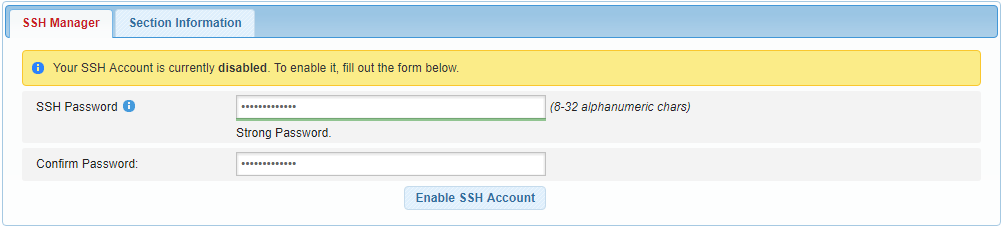
Configuring an SSH account on a Shared Hosting server can be done in four quick steps:

  1. Sign in to your AwardSpace hosting account.
  2. Visit the SSH Manager section.
  3. Choose a password for your SSH account.
  4. Confirm your SSH password and press Enable SSH Account.
ssh manager 1

Congratulations! Your SSH account has been created successfully.


How to Establish an SSH Connection to the Server?

In order to establish an SSH connection, you must have an SSH client program installed on your computer/device. If you do not have an SSH software application, we recommend PuTTY.

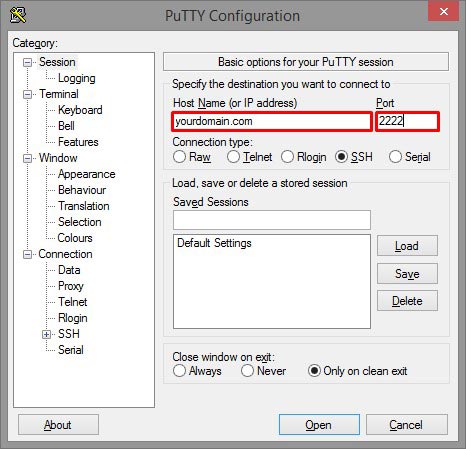
Once you have installed the program, you will be able to connect to your server using the following SSH login details:

SSH host: yourdomain.com (use any hostname that is correctly hosted in your Control Panel -> Website Manager -> Domain Manager section)
Port: 2222 (the default SSH port 22 is not supported, so make sure you use 2222)
ssh manager 2

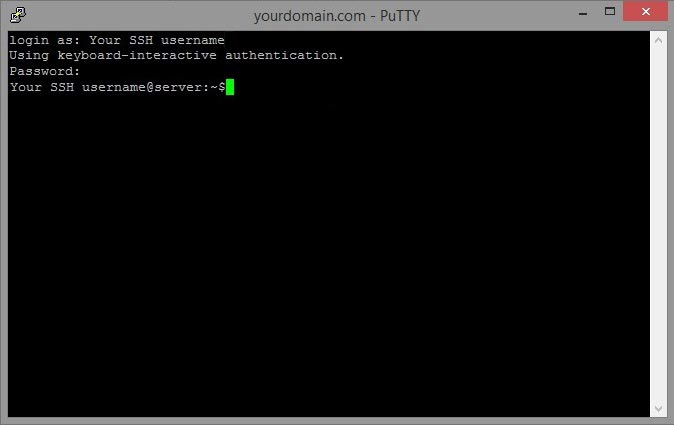
After a successful connection to the server, you will be prompted to enter your SSH username and password:

Login: Your username (the SSH username is the same as your client ID)
Password: Your SSH password (the password you submitted, when you created your SSH account)
ssh manager 3

How to Manipulate Data via SSH?

Below is a list of some common commands that you are likely to find useful when using an SSH terminal:

cd – allows you to change the current working directory
cp – copies a file or folder from one location to another
mv – permanently moves a file or folder from one location to another
rm – removes a file or directory
chmod – allows you to change the permissions of a file/directory
zip – compresses a file/directory
unzip – uncompresses a file/directory

Was this post helpful?

i

Relevant tags:

Connect

Latest posts:

How to Check My Auto Renewals

To check your AwardSpace hosting plan auto-renewals, first log in to the admin dashboard. Then, head to Wallet, within the Orders & Invoices section:   After that, click the Auto Renewals tab, where you can check any relevant information about your hosting...

How to Check My Payment Requests

To check your payment requests, first log in to the AwardSpace hosting panel. Then, head to Wallet within the Orders & Invoices category:   Then, click the Payment Requests tab. There, you can browse all the information you need about your...

How to Check My Invoices

To check your invoices in AwardSpace, first log in to the hosting panel. From there, head to Invoices within the Orders & Invoices category:   From this place, you can browse order references, payment orders, payment types, order dates, and various...

How to Check My Wallet Flow

To check your wallet flow, first log in to the AwardSpace hosting panel. Then, click on Wallet within Payments & Invoices:   After that, click the Wallet Flow tab. This is where you can see details about your wallet flaw:

How to Check My Incomplete Orders

To check your incomplete orders, first log in to the AwardSpace hosting panel. Then, head to Incomplete Orders within Orders & Invoices:   Then, you can check the list within the Incomplete Orders tab:  


Create a website for free!


Free forever

Our Support Team is Here to Help


If you need any questions answered, don't hesitate and contact us. Click the button below and follow the instructions. You can expect an answer within an hour.


Contact AwardSpace


iNewest knowledge base articles

How to Check My Auto Renewals

To check your AwardSpace hosting plan auto-renewals, first log in to the admin dashboard. Then, head to Wallet, within the Orders & Invoices section:   After that, click the Auto Renewals tab, where you can check any relevant information about your hosting...

How to Check My Payment Requests

To check your payment requests, first log in to the AwardSpace hosting panel. Then, head to Wallet within the Orders & Invoices category:   Then, click the Payment Requests tab. There, you can browse all the information you need about your...

How to Check My Invoices

To check your invoices in AwardSpace, first log in to the hosting panel. From there, head to Invoices within the Orders & Invoices category:   From this place, you can browse order references, payment orders, payment types, order dates, and various...

How to Check My Wallet Flow

To check your wallet flow, first log in to the AwardSpace hosting panel. Then, click on Wallet within Payments & Invoices:   After that, click the Wallet Flow tab. This is where you can see details about your wallet flaw:

How to Check My Incomplete Orders

To check your incomplete orders, first log in to the AwardSpace hosting panel. Then, head to Incomplete Orders within Orders & Invoices:   Then, you can check the list within the Incomplete Orders tab:  

How to Check My Canceled Orders

To check your canceled orders with AwardSpace, first, log in to the hosting panel. Then, head to Caneled Orders within the Orders & Invoices category:   Then, within the Canceled Orders tab, you can browse your canceled orders with AwardSpace:

Even more web tutorials

Check out our web hosting knowledge base and the WordPress tutorials to learn more, and be better prepared for your website creation and maintenance journey.