
Access and Error Logs

Home » Knowledge Base » Control Panel » Website Statistics » Access and Error Logs

This article provides brief instructions on how to use the Access and Error Logs section in the AwardSpace Control Panel.


What are the access and error logs for?

You can use the access logs to see the successfully established connections to your domain/sub-domain name. You can use the error logs to gather information about the web server errors your visitors have experienced.


How Can I Download My Access and Error Log File?

To download the access/error log file for a specific hostname (website), please perform the following actions:

  1. Log into the Control Panel of your AwardSpace hosting account.
  2. Open the Access & Error Logs page.
  3. Click on the hostname you would like to view or click the Options icon.

To download the access log file for your domain/sub-domain, select the Access Logs tab. Click on the View Log button. This will download the file to your computer.
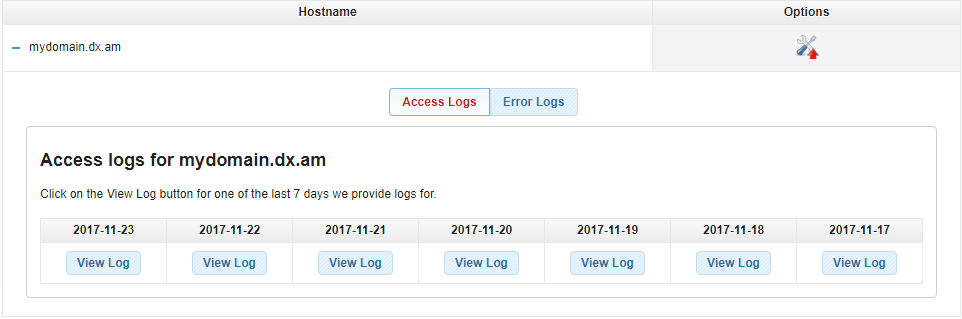
access and error logs 1

To download an error file, click on the Error Logs tab and press View log.
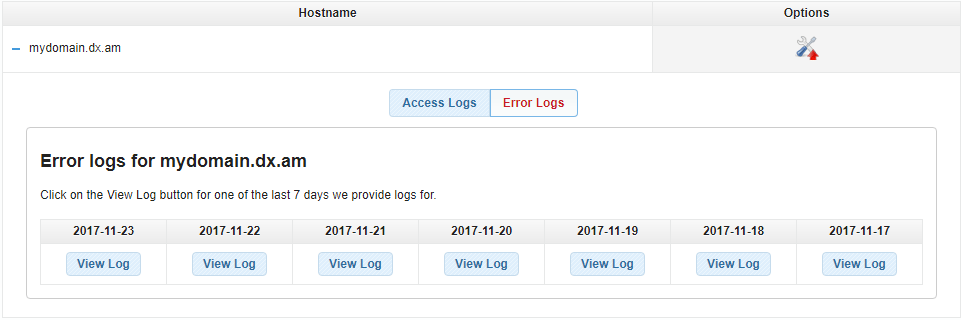
access and error logs 2


How Do I View My Access and Error Log File?

Access and Error logs are best viewed in a text editor. We recommend using NotePad, WordPad, or Microsoft Word.


What Errors Can I See in the Error Log File?

The error log file allows you to view only web server errors like denied connection requests, internal server errors, etc.


How Can I See Errors Using a PHP Script?

You can enable the reporting of errors in your PHP script at runtime using the error_reporting() function and defining the reporting level.

PHP error reporting can be enabled for all PHP scripts in your account by setting the error_reporting() to the desired level using the PHP Settings section and the “Configure php.ini” tab.


How Can I Log Custom Errors from a PHP Script?

You can use the PHP error_log() function in your script to track possible faults and log errors.

Was this post helpful?

i

Relevant tags:

Connect

Latest posts:

How to Check My Auto Renewals

To check your AwardSpace hosting plan auto-renewals, first log in to the admin dashboard. Then, head to Wallet, within the Orders & Invoices section:   After that, click the Auto Renewals tab, where you can check any relevant information about your hosting...

How to Check My Payment Requests

To check your payment requests, first log in to the AwardSpace hosting panel. Then, head to Wallet within the Orders & Invoices category:   Then, click the Payment Requests tab. There, you can browse all the information you need about your...

How to Check My Invoices

To check your invoices in AwardSpace, first log in to the hosting panel. From there, head to Invoices within the Orders & Invoices category:   From this place, you can browse order references, payment orders, payment types, order dates, and various...

How to Check My Wallet Flow

To check your wallet flow, first log in to the AwardSpace hosting panel. Then, click on Wallet within Payments & Invoices:   After that, click the Wallet Flow tab. This is where you can see details about your wallet flaw:

How to Check My Incomplete Orders

To check your incomplete orders, first log in to the AwardSpace hosting panel. Then, head to Incomplete Orders within Orders & Invoices:   Then, you can check the list within the Incomplete Orders tab:  


Create a website for free!


Free forever

Our Support Team is Here to Help


If you need any questions answered, don't hesitate and contact us. Click the button below and follow the instructions. You can expect an answer within an hour.


Contact AwardSpace


iNewest knowledge base articles

How to Check My Auto Renewals

To check your AwardSpace hosting plan auto-renewals, first log in to the admin dashboard. Then, head to Wallet, within the Orders & Invoices section:   After that, click the Auto Renewals tab, where you can check any relevant information about your hosting...

How to Check My Payment Requests

To check your payment requests, first log in to the AwardSpace hosting panel. Then, head to Wallet within the Orders & Invoices category:   Then, click the Payment Requests tab. There, you can browse all the information you need about your...

How to Check My Invoices

To check your invoices in AwardSpace, first log in to the hosting panel. From there, head to Invoices within the Orders & Invoices category:   From this place, you can browse order references, payment orders, payment types, order dates, and various...

How to Check My Wallet Flow

To check your wallet flow, first log in to the AwardSpace hosting panel. Then, click on Wallet within Payments & Invoices:   After that, click the Wallet Flow tab. This is where you can see details about your wallet flaw:

How to Check My Incomplete Orders

To check your incomplete orders, first log in to the AwardSpace hosting panel. Then, head to Incomplete Orders within Orders & Invoices:   Then, you can check the list within the Incomplete Orders tab:  

How to Check My Canceled Orders

To check your canceled orders with AwardSpace, first, log in to the hosting panel. Then, head to Caneled Orders within the Orders & Invoices category:   Then, within the Canceled Orders tab, you can browse your canceled orders with AwardSpace:

Even more web tutorials

Check out our web hosting knowledge base and the WordPress tutorials to learn more, and be better prepared for your website creation and maintenance journey.