
How to Access the Security Settings of My Domains

Home » Knowledge Base » Control Panel » Domain Manager » How to Access the Security Settings of My Domains

Accessing the security settings of your hosted domains is easy with AwardSpace. You can access the settings in just a few minutes by following the steps below.

First, log in to the AwardSpace hosting panel.

Then, head to the Domain Manager page by clicking the dedicated icon:
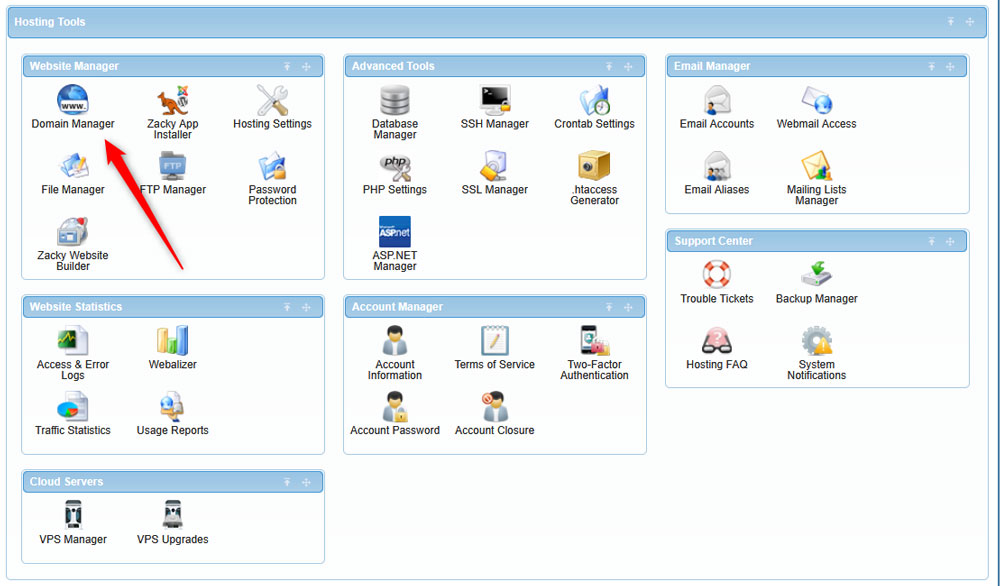
Head to Domain Manager via the AwardSpace hosting panel


Then, locate the hosted domain name whose security options you wish to access and click the Settings menu on the right:

Click on the Settings icon, so to open the security settings for your hosted domains


After you do so, a new menu will appear. Once you see it, click on Security:

Access the security options via the menu that appears once you click on Settings


Once you do, a list with options will appear:
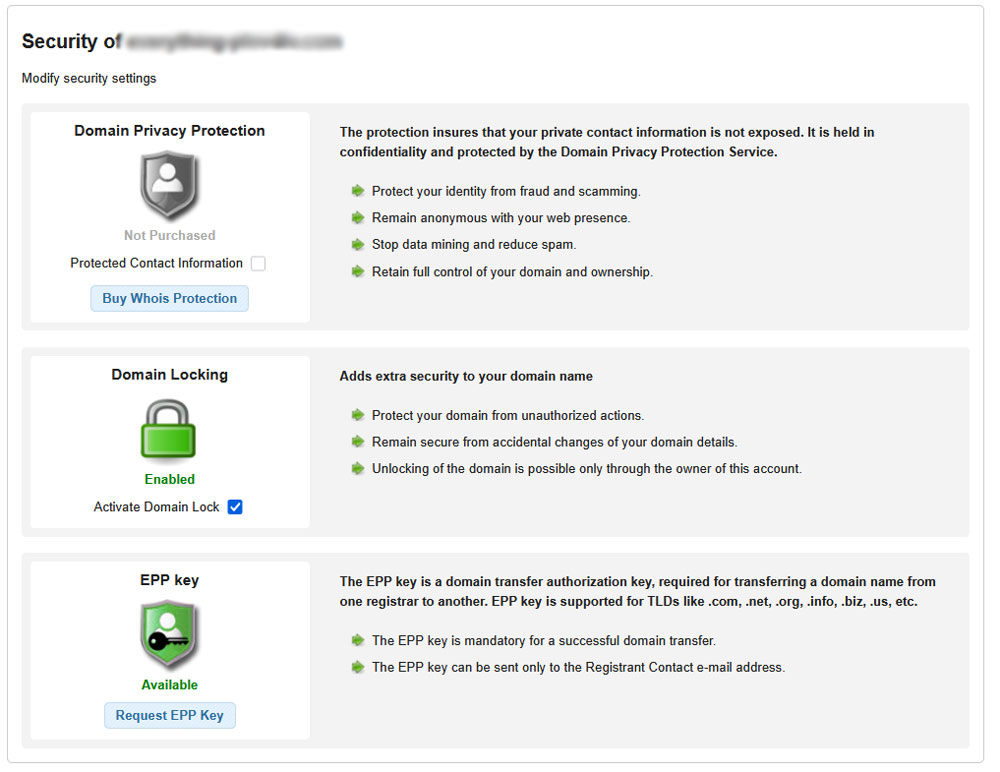
Security options for your domains


Browse the options and select the one that works for your case the best:

  • Domain Privacy Protection – Secures the private contact information, and also protects your identity, and stops data mining.
  • Domain Locking – protects your hosted domain from unauthorized actions and accidental changes.
  • EPP Key – required for domain transfer.

 

Was this post helpful?

i

Relevant tags:

Connect

Latest posts:

How to Purchase a Semi-Dedicated Hosting Plan

You can quickly and easily purchase a Semi-Dedicated hosting plan with AwardSpace. You only need a few clicks and a few minutes of your time. Here's what to do. First, log in to the AwardSpace hosting panel. Then, head to Semi-Dedicated Hosting in the Buy Services...

How to Purchase a VPS Hosting Plan

Purchasing а VPS hosting plan with AwardSpace is simple. You only need to follow a few steps, and you will have the setup made in no time. Here's how to proceed. First, log in to the AwardSpace hosting panel. Then, click on the Virtual Private Servers (VPS) icon...

How to Check My Hosting Limits

To check your hosting limits, follow these steps: First, log in to the hosting control panel. Then, via the dashboard, head to Hosting Settings:   After that, click the Hosting Limits tab:   Then, you will access the information about your account's hosting...


Create a website for free!


Free forever

Our Support Team is Here to Help


If you need any questions answered, don't hesitate and contact us. Click the button below and follow the instructions. You can expect an answer within an hour.


Contact AwardSpace


iNewest knowledge base articles

How to Purchase a Semi-Dedicated Hosting Plan

You can quickly and easily purchase a Semi-Dedicated hosting plan with AwardSpace. You only need a few clicks and a few minutes of your time. Here's what to do. First, log in to the AwardSpace hosting panel. Then, head to Semi-Dedicated Hosting in the Buy Services...

How to Purchase a VPS Hosting Plan

Purchasing а VPS hosting plan with AwardSpace is simple. You only need to follow a few steps, and you will have the setup made in no time. Here's how to proceed. First, log in to the AwardSpace hosting panel. Then, click on the Virtual Private Servers (VPS) icon...

How to Check My Hosting Limits

To check your hosting limits, follow these steps: First, log in to the hosting control panel. Then, via the dashboard, head to Hosting Settings:   After that, click the Hosting Limits tab:   Then, you will access the information about your account's hosting...

How to Access The Name Servers Settings of My Domain

Accessing the name server settings with AwardSpace is quite simple. Just follow the next steps. First, log in to the AwardSpace hosting panel. Then, head to Domain Manager:   After that, locate the domain whose Name Server settings you wish to access and click...

Even more web tutorials

Check out our web hosting knowledge base and the WordPress tutorials to learn more, and be better prepared for your website creation and maintenance journey.