
How to Use FTP Configuration Files

Home » Knowledge Base » Control Panel » FTP Manager » How to Use FTP Configuration Files

Using the FTP configuration files via the AwardSpace hosting panel is quite simple and can help you achieve your goals quickly and easily.

To use the FTP configuration files, you should first access them.

First, log in to the hosting panel.

Then, make sure to create an FTP account.

Read also: How to Change Password of an FTP account.

Now that you are in the AwardSpace hosting panel, head to the FTP Manager:
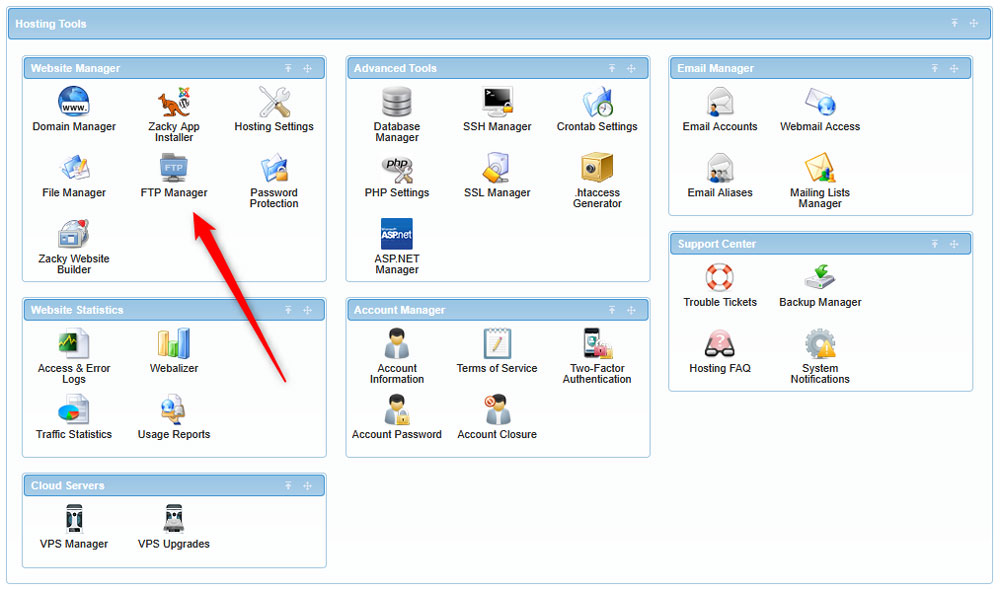
Access the FTP Manager page via the AwardSpace hosting panel


Now, while on the FTP Manager page, select an FTP account you wish to use. To do so, click the blue + icon next to each of your FTP accounts:
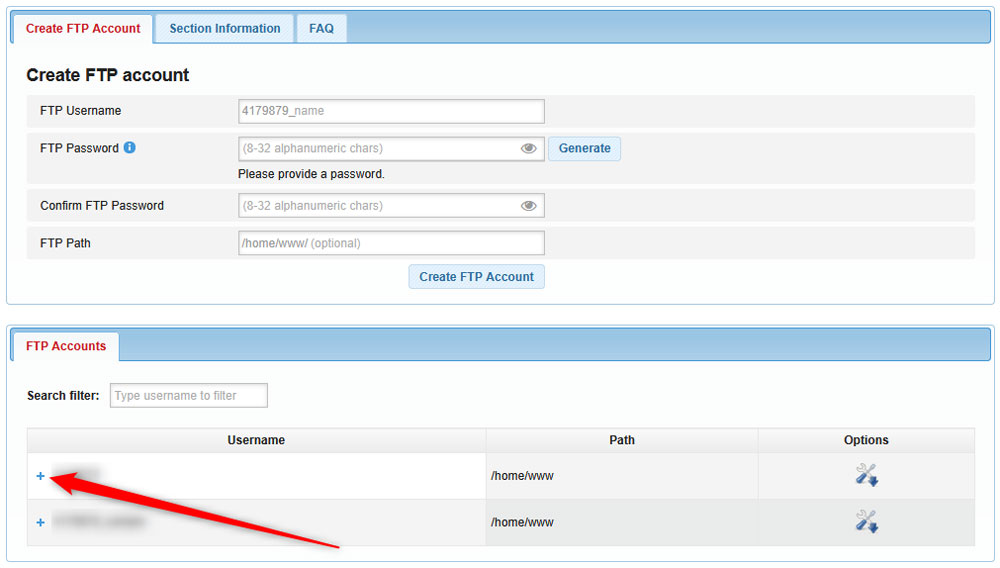
Select an FTP account to use


Once you click the + icon, a new section with buttons will appear. Click on FTP Configuration Files:
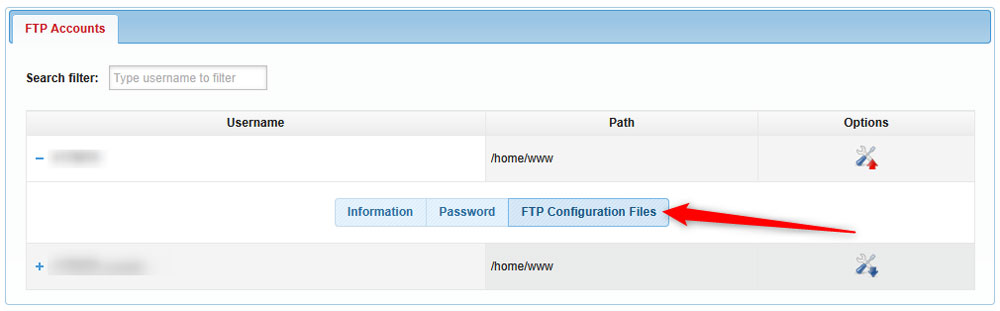
Click on FTP Configuration Files from the menu


A list of available configuration files will appear. Each file is designed to fit different FTP management platforms such as FileZilla, CoffeeCup Free FTP, Cyberduck, and WinSCP:
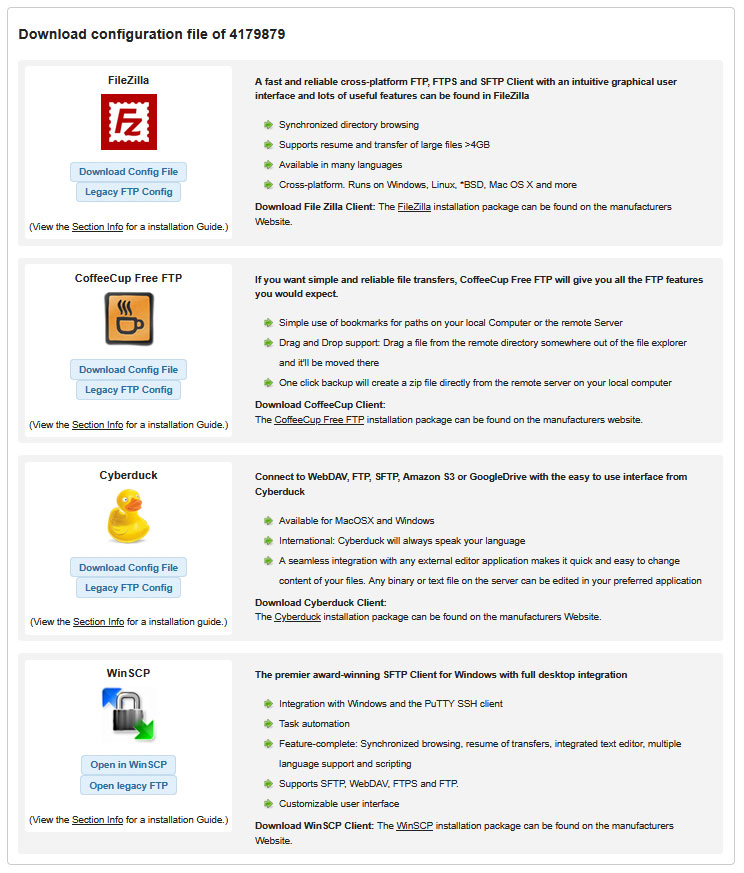
List of available FTP platforms


Now, you can download the config file for each of your hosted websites. To do so, simply click on the Download Config File or Legacy FTP Config buttons, right below the icon of each FTP platform:
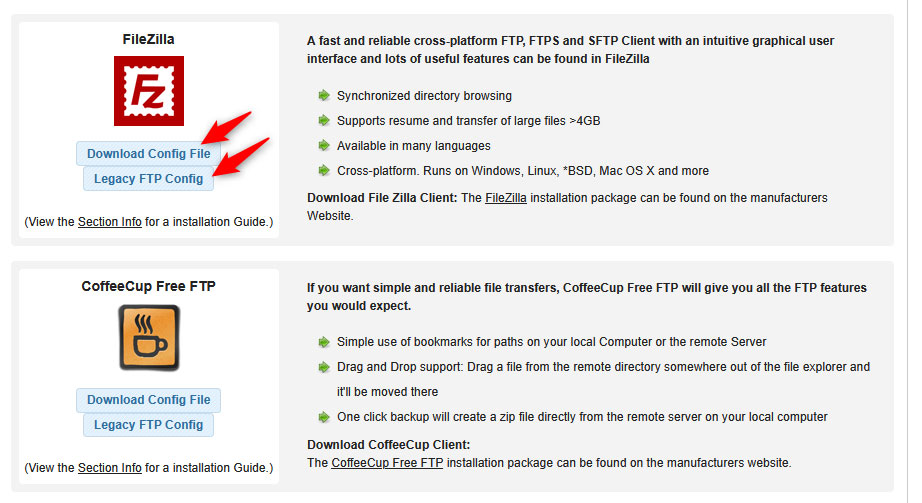
Download the config files on your device


Now, you can use the file to transfer files via the platform you choose.

If you are not sure how to proceed, then check our articles on the topic:



Was this post helpful?

i

Relevant tags:

Connect

Latest posts:

How to Check My Auto Renewals

To check your AwardSpace hosting plan auto-renewals, first log in to the admin dashboard. Then, head to Wallet, within the Orders & Invoices section:   After that, click the Auto Renewals tab, where you can check any relevant information about your hosting...

How to Check My Payment Requests

To check your payment requests, first log in to the AwardSpace hosting panel. Then, head to Wallet within the Orders & Invoices category:   Then, click the Payment Requests tab. There, you can browse all the information you need about your...

How to Check My Invoices

To check your invoices in AwardSpace, first log in to the hosting panel. From there, head to Invoices within the Orders & Invoices category:   From this place, you can browse order references, payment orders, payment types, order dates, and various...

How to Check My Wallet Flow

To check your wallet flow, first log in to the AwardSpace hosting panel. Then, click on Wallet within Payments & Invoices:   After that, click the Wallet Flow tab. This is where you can see details about your wallet flaw:

How to Check My Incomplete Orders

To check your incomplete orders, first log in to the AwardSpace hosting panel. Then, head to Incomplete Orders within Orders & Invoices:   Then, you can check the list within the Incomplete Orders tab:  


Create a website for free!


Free forever

Our Support Team is Here to Help


If you need any questions answered, don't hesitate and contact us. Click the button below and follow the instructions. You can expect an answer within an hour.


Contact AwardSpace


iNewest knowledge base articles

How to Check My Auto Renewals

To check your AwardSpace hosting plan auto-renewals, first log in to the admin dashboard. Then, head to Wallet, within the Orders & Invoices section:   After that, click the Auto Renewals tab, where you can check any relevant information about your hosting...

How to Check My Payment Requests

To check your payment requests, first log in to the AwardSpace hosting panel. Then, head to Wallet within the Orders & Invoices category:   Then, click the Payment Requests tab. There, you can browse all the information you need about your...

How to Check My Invoices

To check your invoices in AwardSpace, first log in to the hosting panel. From there, head to Invoices within the Orders & Invoices category:   From this place, you can browse order references, payment orders, payment types, order dates, and various...

How to Check My Wallet Flow

To check your wallet flow, first log in to the AwardSpace hosting panel. Then, click on Wallet within Payments & Invoices:   After that, click the Wallet Flow tab. This is where you can see details about your wallet flaw:

How to Check My Incomplete Orders

To check your incomplete orders, first log in to the AwardSpace hosting panel. Then, head to Incomplete Orders within Orders & Invoices:   Then, you can check the list within the Incomplete Orders tab:  

How to Check My Canceled Orders

To check your canceled orders with AwardSpace, first, log in to the hosting panel. Then, head to Caneled Orders within the Orders & Invoices category:   Then, within the Canceled Orders tab, you can browse your canceled orders with AwardSpace:

Even more web tutorials

Check out our web hosting knowledge base and the WordPress tutorials to learn more, and be better prepared for your website creation and maintenance journey.