
How to Enable Two-Factor Authenticator

Home » Knowledge Base » Control Panel » Account Manager » How to Enable Two-Factor Authenticator

Using two-factor authentication is a great way to add one more layer of security to your AwardSpace hosting account. Here’s how to enable the feature.

First, log in to the hosting control panel.

Then, head to Two-Factor Authenticator within the Account Manager box:
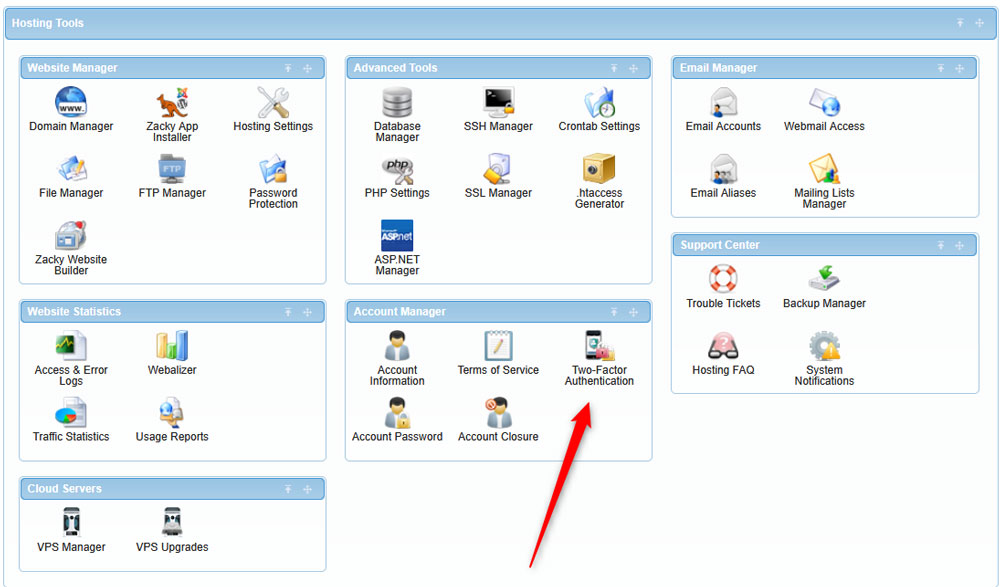
Enable two-factor authentication via the AwardSpace hosting panel


After that, click the Enable button within the Two-Factor Authentication tab:
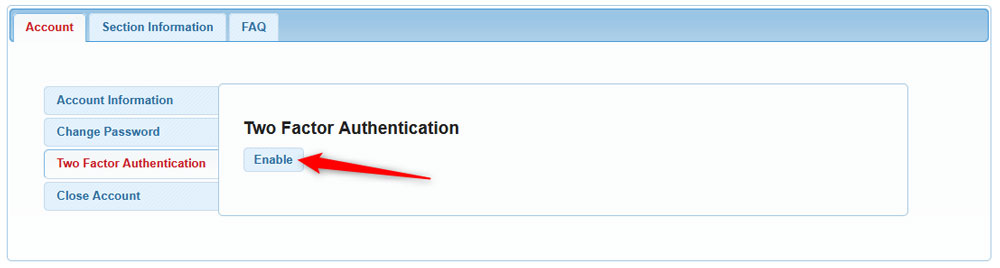
Enable the two factor authentication by clicking the button


Then, choose a name for the device you will be using for the authentication process. You can use labels such as “my smartphone“, or anything else:

Choose a name for the device you are going to use for the two-factor authentication


Then, download an authentication application on your smartphone that you will be using for the process. Some handy authentication apps you can use are:

  • KeePassXC
  • Google Authentication
  • Authy
  • 1Password


After that, scan the QR code you see on your computer via the authenticator app on your phone.

Once the scan is complete, you will see a verification code displayed within the authentication app. Insert this code within the Verification Code field in the AwardSpace dialogue box on your computer:
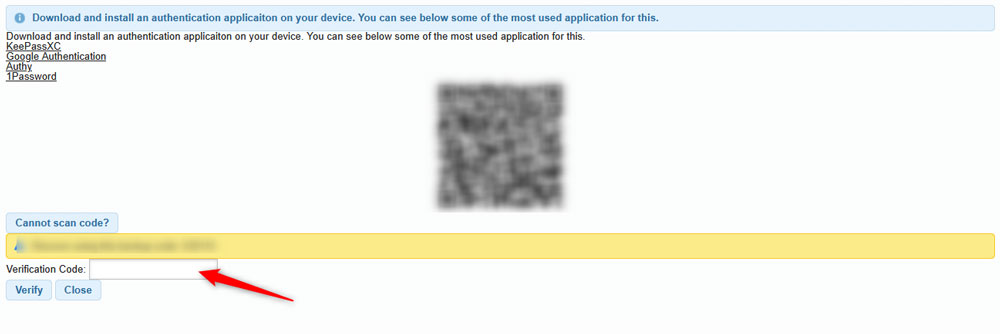
Scan the QR code with your phone to enable the authenticator process


You will receive a confirmation message. Now, you have successfully verified your device for two-factor authentication.

You can always revoke your device by clicking the Revoke Device button:
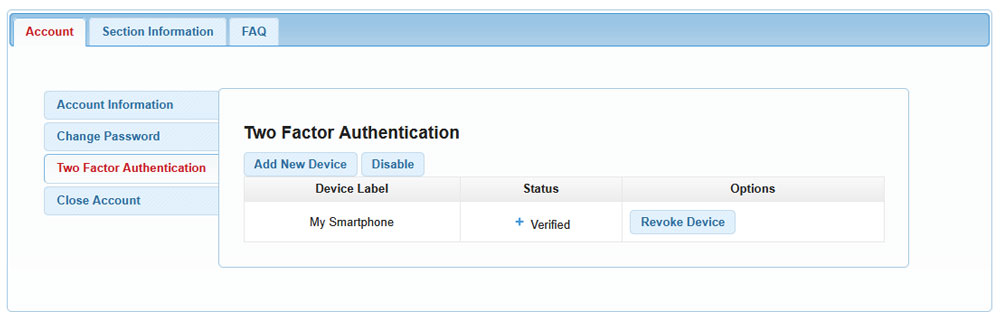
Service enabled message


For more information, you can have a look at the Section Information and FAQ tabs:
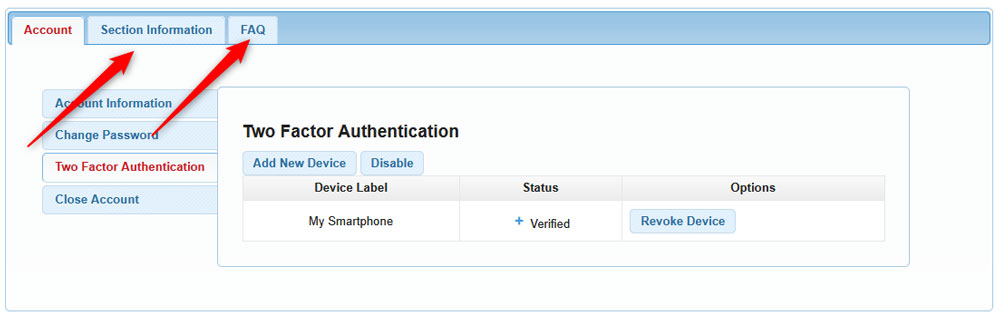
Check the Iformation and FAQ sections for further details

Was this post helpful?

i

Relevant tags:

Connect

Latest posts:

How to Check My Auto Renewals

To check your AwardSpace hosting plan auto-renewals, first log in to the admin dashboard. Then, head to Wallet, within the Orders & Invoices section:   After that, click the Auto Renewals tab, where you can check any relevant information about your hosting...

How to Check My Payment Requests

To check your payment requests, first log in to the AwardSpace hosting panel. Then, head to Wallet within the Orders & Invoices category:   Then, click the Payment Requests tab. There, you can browse all the information you need about your...

How to Check My Invoices

To check your invoices in AwardSpace, first log in to the hosting panel. From there, head to Invoices within the Orders & Invoices category:   From this place, you can browse order references, payment orders, payment types, order dates, and various...

How to Check My Wallet Flow

To check your wallet flow, first log in to the AwardSpace hosting panel. Then, click on Wallet within Payments & Invoices:   After that, click the Wallet Flow tab. This is where you can see details about your wallet flaw:

How to Check My Incomplete Orders

To check your incomplete orders, first log in to the AwardSpace hosting panel. Then, head to Incomplete Orders within Orders & Invoices:   Then, you can check the list within the Incomplete Orders tab:  


Create a website for free!


Free forever

Our Support Team is Here to Help


If you need any questions answered, don't hesitate and contact us. Click the button below and follow the instructions. You can expect an answer within an hour.


Contact AwardSpace


iNewest knowledge base articles

How to Check My Auto Renewals

To check your AwardSpace hosting plan auto-renewals, first log in to the admin dashboard. Then, head to Wallet, within the Orders & Invoices section:   After that, click the Auto Renewals tab, where you can check any relevant information about your hosting...

How to Check My Payment Requests

To check your payment requests, first log in to the AwardSpace hosting panel. Then, head to Wallet within the Orders & Invoices category:   Then, click the Payment Requests tab. There, you can browse all the information you need about your...

How to Check My Invoices

To check your invoices in AwardSpace, first log in to the hosting panel. From there, head to Invoices within the Orders & Invoices category:   From this place, you can browse order references, payment orders, payment types, order dates, and various...

How to Check My Wallet Flow

To check your wallet flow, first log in to the AwardSpace hosting panel. Then, click on Wallet within Payments & Invoices:   After that, click the Wallet Flow tab. This is where you can see details about your wallet flaw:

How to Check My Incomplete Orders

To check your incomplete orders, first log in to the AwardSpace hosting panel. Then, head to Incomplete Orders within Orders & Invoices:   Then, you can check the list within the Incomplete Orders tab:  

How to Check My Canceled Orders

To check your canceled orders with AwardSpace, first, log in to the hosting panel. Then, head to Caneled Orders within the Orders & Invoices category:   Then, within the Canceled Orders tab, you can browse your canceled orders with AwardSpace:

Even more web tutorials

Check out our web hosting knowledge base and the WordPress tutorials to learn more, and be better prepared for your website creation and maintenance journey.
