
What Is the Purpose of the Intermediate Certificate Authority in SSLs?

Home » Knowledge Base » SSL (Secure Sockets Layer) » What Is the Purpose of the Intermediate Certificate Authority in SSLs?

SSL certificates are, without a doubt, becoming more and more ubiquitous throughout the web. Not only do they allow you to secure visitors’ connections to your site, but they can also help you rank better in search results. As such, getting an SSL certificate is a no-brainer in most cases.

But when you do get your SSL certificate, you may be surprised to discover that there are actually three different parts to it – the SSL certificate itself, the Intermediate Certificate Authority (CA), and the Private Key. In this article, we will describe how an SSL works and we will focus on the purpose of the Intermediate Certificate Authority.


What Is an SSL Certificate?

SSL, which stands for Secure Sockets Layer, is a popular Digital Certificate. At the heart of every SSL certificate, you will find a set of cryptographic keys. These keys are different on each certificate and they uniquely represent the organization or person for whom the certificate is issued.


What Is the Purpose of an SSL Certificate?

The cryptographic keys in SSL certificates are commonly used to enable HTTPS on websites. Additionally, SSL certificates can confirm the identity of the domain where they are installed, thus preventing phishing attacks. SSL certificates have other uses as well, such as verifying that programs and documents have not been tampered with.

Clicking on the padlock icon in your browser address bar will allow you to view additional details for the SSL certificate that is being used.


How Do SSL Certificates Work?

Each certificate is created by a trusted Certificate Authority. Before issuing the SSL, the Certificate Authority has the task of verifying the data submitted by the applicant. Once all data is confirmed to be correct and factual, a set of cryptographic keys is generated and the certificate is issued.
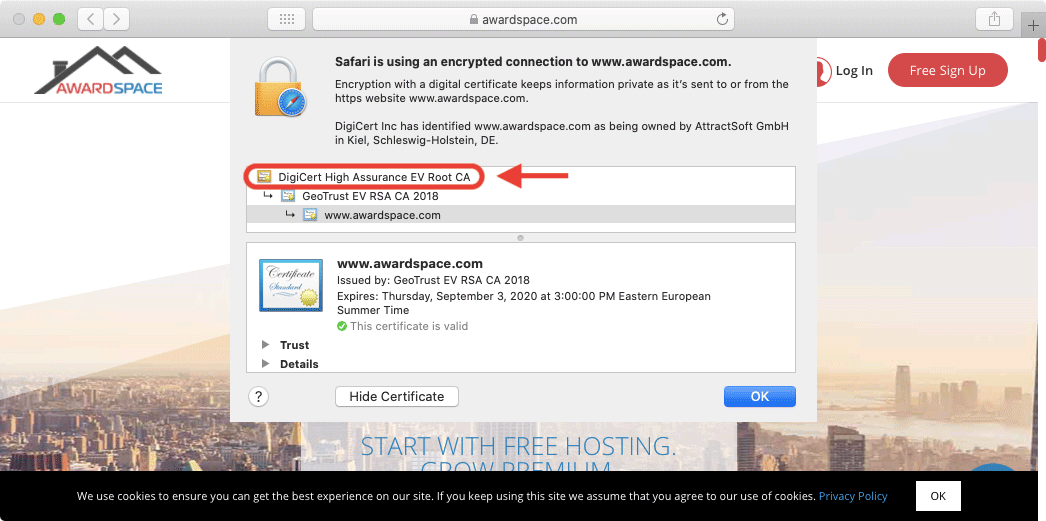
Most web browsers make it easy to spot the Certificate Authority that has issued the SSL certificate for a specific website.

An SSL certificate’s security value is derived from two main factors: that the Certificate Authority that has issued the SSL is a trusted one and that the Certificate Authority has performed validity checks before issuing the certificate. As such, when you purchase an SSL certificate and install the SSL on your website, the Certificate Authority effectively vouches for the authenticity of your website.

Each Certificate Authority has its own certificate known as a Root CA certificate. This Root CA certificate is used during the creation of your SSL certificate. The Root CA certificates are trusted by most operating systems and web browsers and as such, your SSL certificate is also trusted by extension.
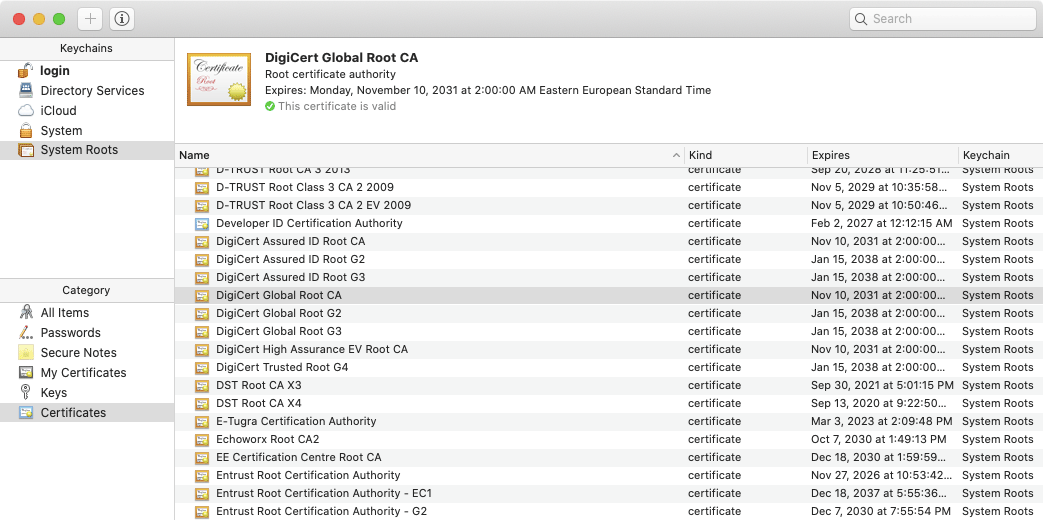
All major operating systems have a database of Root CA certificates that are implicitly trusted.

It is actually not common for a Certificate Authority to use its Root CA certificate to issue SSL and other end-user certificates. Instead, an additional layer of certificates is used. These additional certificates are called Intermediate Certificate Authority (CA) certificates.


What Is the Purpose of the Intermediate CA Certificate?

Intermediate CA certificates act as middlemen between the Root CA certificate and the certificates issued to end-users. All three types of certificates create a chain of trust: the web browser implicitly trusts the Root CA certificate, the Root CA certificate trusts the Intermediate CA certificate, and finally, the Intermediate CA certificate trusts the end-user’s SSL certificate.
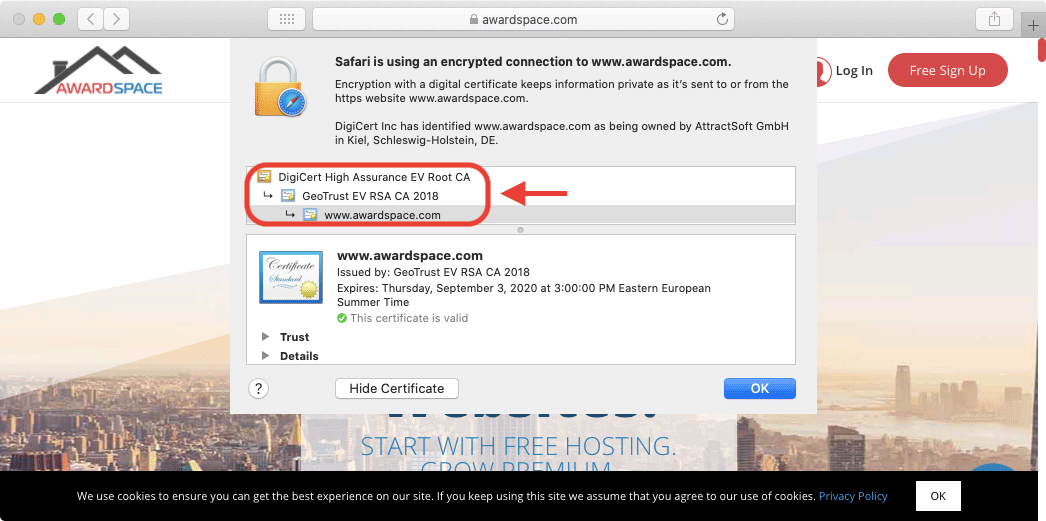
In the screenshot you can see the chain of trust between the three types of certificates.
In the screenshot, you can see the chain of trust between the three types of certificates.


Why Is the Intermediate Certificate Authority Important?

The idea behind the Intermediate CA certificates is to add an extra layer of protection. This higher level of protection is achieved by not having to use the Root CA certificate to issue certificates for end-users. Instead, the Root CA certificate mainly issues Intermediate CA certificates, and these Intermediate CA certificates create SSLs for third-party organizations and individuals.


Is the Intermediate CA Certificate Mandatory?

While it is possible to upload a custom SSL certificate without including the Intermediate CA certificate, it is not recommended. As we have outlined above, the Intermediate CA certificate plays a vital role in the chain of trust between the Root CA certificate and your SSL certificate. By omitting the Intermediate CA certificate, you are breaking this chain of trust.

As a result, most web browsers and operating systems will not be able to recognize that your SSL certificate is coming from a legitimate Certificate Authority. To make matters worse, instead of loading the website, you will likely be presented with a warning message, such as the one shown below:
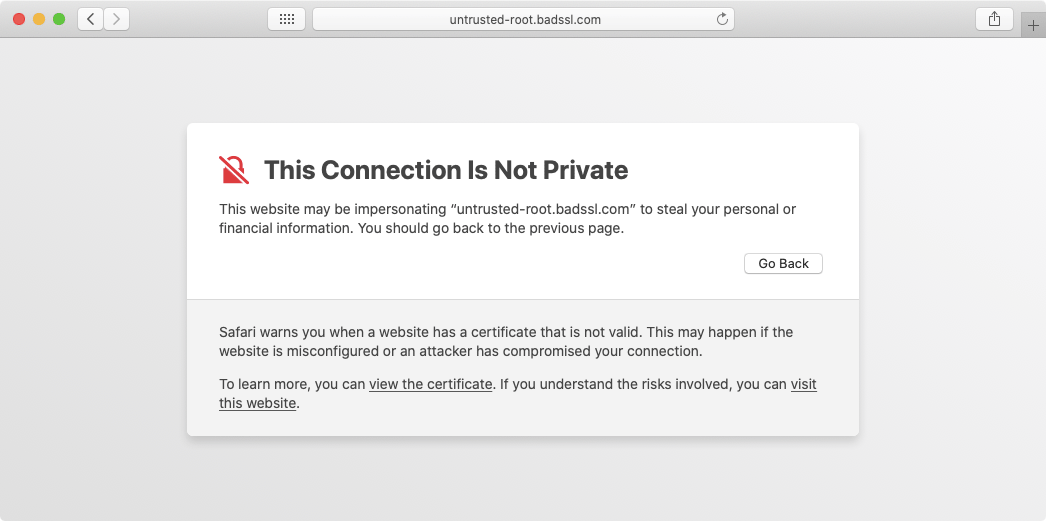
When you break the chain of trust, web browsers can no longer guarantee that the SSL originates from a trusted source.


Conclusion

The inclusion of the Intermediate Certificate Authority, although optional, is highly recommended for all website owners. Without the Intermediate Certificate Authority, not all web browsers will recognize the installed SSL certificate as a legitimate one and will display messages discouraging visitors from proceeding to your website.

If you would like to ensure that your SSL is using the Intermediate Certificate Authority, you can contact our 24/7 Technical Support Team for assistance. The only requirements are that you need to be using one of our premium shared hosting plans and that you need to have an active SSL certificate on your domain name.

Was this post helpful?

i

Relevant tags:

Connect

Latest posts:

How to Fix 308 Permanent Redirect

308 Permanent Redirect is an HTTPS status code indicating that the requested resource has been permanently moved to another location. Similar to 301 Moved Permanently, 308 informs the user of the movement of a given online resource, and unlike the 301 redirect, 308...

How to Fix 301 Error Moved Permanently

The 301 Moved Permanently is an HTTP status code that indicates a permanent relocation of an online resource from a given URL to a new one. More technically, the moved resource has been moved to the new URL specified in the Location header. The HTTP 301 status code is...

How to Fix 307 Temporary Redirect

307 Temporary Redirect is a response HTTP status code that indicates the requested resource has been moved to a different URL for a limited period of time. Unlike a 301 permanent redirect, the 307 Temporary Redirect message indicates that the change is temporary and...

How to Access Crontab Settings

To access the crontab settings, first, you need to log in to your AwardSpace hosting panel. After you have logged in, head to Crontab Settings, located within the Advanced Tools category:   After you click the Crontab Settings icon, a new page should load. Once...

How to Check My Auto Renewals

To check your AwardSpace hosting plan auto-renewals, first log in to the admin dashboard. Then, head to Wallet, within the Orders & Invoices section:   After that, click the Auto Renewals tab, where you can check any relevant information about your hosting...


Create a website for free!


Free forever

Our Support Team is Here to Help


If you need any questions answered, don't hesitate and contact us. Click the button below and follow the instructions. You can expect an answer within an hour.


Contact AwardSpace


iNewest knowledge base articles

How to Fix 308 Permanent Redirect

308 Permanent Redirect is an HTTPS status code indicating that the requested resource has been permanently moved to another location. Similar to 301 Moved Permanently, 308 informs the user of the movement of a given online resource, and unlike the 301 redirect, 308...

How to Fix 301 Error Moved Permanently

The 301 Moved Permanently is an HTTP status code that indicates a permanent relocation of an online resource from a given URL to a new one. More technically, the moved resource has been moved to the new URL specified in the Location header. The HTTP 301 status code is...

How to Fix 307 Temporary Redirect

307 Temporary Redirect is a response HTTP status code that indicates the requested resource has been moved to a different URL for a limited period of time. Unlike a 301 permanent redirect, the 307 Temporary Redirect message indicates that the change is temporary and...

How to Access Crontab Settings

To access the crontab settings, first, you need to log in to your AwardSpace hosting panel. After you have logged in, head to Crontab Settings, located within the Advanced Tools category:   After you click the Crontab Settings icon, a new page should load. Once...

How to Check My Auto Renewals

To check your AwardSpace hosting plan auto-renewals, first log in to the admin dashboard. Then, head to Wallet, within the Orders & Invoices section:   After that, click the Auto Renewals tab, where you can check any relevant information about your hosting...

How to Check My Payment Requests

To check your payment requests, first log in to the AwardSpace hosting panel. Then, head to Wallet within the Orders & Invoices category:   Then, click the Payment Requests tab. There, you can browse all the information you need about your...

Even more web tutorials

Check out our web hosting knowledge base and the WordPress tutorials to learn more, and be better prepared for your website creation and maintenance journey.