
How to Log Into the Hosting Control Panel?

Home » Knowledge Base » Hosting Basics » How to Log Into the Hosting Control Panel?

Should you sign up for a free web hosting service, or any of our premium hosting solutions, you’ll be automatically redirected to your brand new Hosting Control Panel. From there, you’ll be able to purchase and/or manage your domain names and create free subdomains. Your hosting control panel is essentially where you’ll be dealing with most of the things, regarding your hosting account. Including but not limited to creating databases and taking the first steps towards creating a website. This is where you’ll check your bandwidth usage, etc.

Related: Learn everything about AwardSpace’s Control Panel

After you’ve installed a CMS of your choosing, most often than not, you’ll spend a lot more time in the CMS’s Dashboard, where most of the website settings are to be tuned. Especially if you are new to website maintenance, chances are, at a certain point, you’ll forget that there is another place for you to log in and to make changes.

As you can guess, the hosting control panel and your CMS Dashboard are quite different entities.


How to log into the Hosting Control Panel?

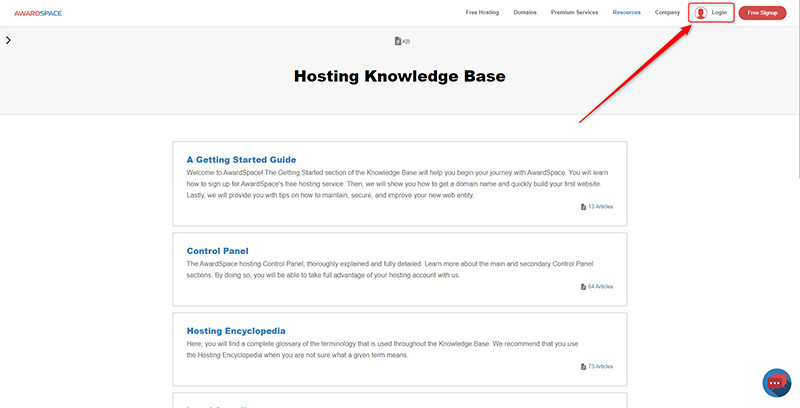
In order to log into your hosting control panel, click the button on the top right of the current page which says Login:
 

Now that you’ve navigated to the Login Page, choose the option that is related to the way you’ve signed up for our services.
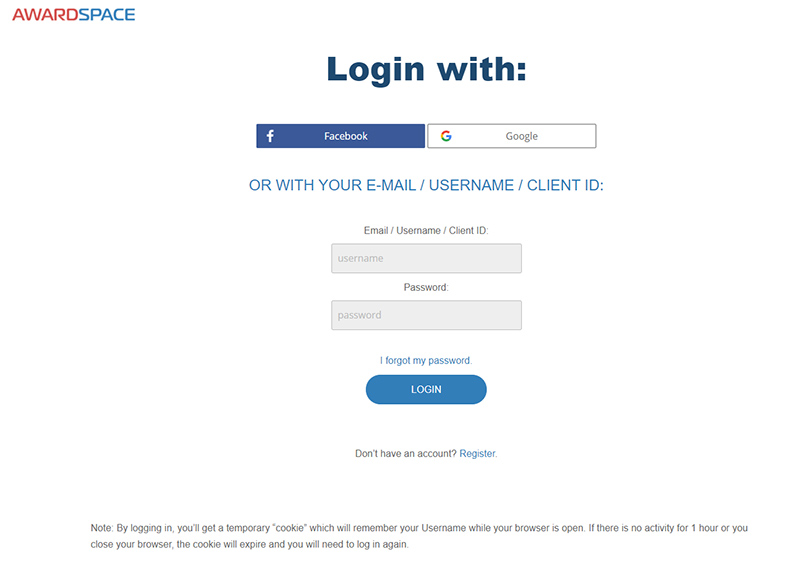
That is, if you used your Facebook or Google account, click on the button related to the service you’ve used. Otherwise, if you used the more classic way of signing up for our free services – an email and a password (it is highly recommended to add a strong password to your account, no matter the method you’ve used to signup) – you simply navigate to the fields below.

If you log in with your email and password, you can use your Email, Username, or Client ID.

It is an either-or situation. You should only fill in one of those, and the password that you’ve created with the account.


Further reading: How to retrieve a lost account or password?

Was this post helpful?

i

Relevant tags:

Connect

Latest posts:

How to Check My Auto Renewals

To check your AwardSpace hosting plan auto-renewals, first log in to the admin dashboard. Then, head to Wallet, within the Orders & Invoices section:   After that, click the Auto Renewals tab, where you can check any relevant information about your hosting...

How to Check My Payment Requests

To check your payment requests, first log in to the AwardSpace hosting panel. Then, head to Wallet within the Orders & Invoices category:   Then, click the Payment Requests tab. There, you can browse all the information you need about your...

How to Check My Invoices

To check your invoices in AwardSpace, first log in to the hosting panel. From there, head to Invoices within the Orders & Invoices category:   From this place, you can browse order references, payment orders, payment types, order dates, and various...

How to Check My Wallet Flow

To check your wallet flow, first log in to the AwardSpace hosting panel. Then, click on Wallet within Payments & Invoices:   After that, click the Wallet Flow tab. This is where you can see details about your wallet flaw:

How to Check My Incomplete Orders

To check your incomplete orders, first log in to the AwardSpace hosting panel. Then, head to Incomplete Orders within Orders & Invoices:   Then, you can check the list within the Incomplete Orders tab:  


Create a website for free!


Free forever

Our Support Team is Here to Help


If you need any questions answered, don't hesitate and contact us. Click the button below and follow the instructions. You can expect an answer within an hour.


Contact AwardSpace


iNewest knowledge base articles

How to Check My Auto Renewals

To check your AwardSpace hosting plan auto-renewals, first log in to the admin dashboard. Then, head to Wallet, within the Orders & Invoices section:   After that, click the Auto Renewals tab, where you can check any relevant information about your hosting...

How to Check My Payment Requests

To check your payment requests, first log in to the AwardSpace hosting panel. Then, head to Wallet within the Orders & Invoices category:   Then, click the Payment Requests tab. There, you can browse all the information you need about your...

How to Check My Invoices

To check your invoices in AwardSpace, first log in to the hosting panel. From there, head to Invoices within the Orders & Invoices category:   From this place, you can browse order references, payment orders, payment types, order dates, and various...

How to Check My Wallet Flow

To check your wallet flow, first log in to the AwardSpace hosting panel. Then, click on Wallet within Payments & Invoices:   After that, click the Wallet Flow tab. This is where you can see details about your wallet flaw:

How to Check My Incomplete Orders

To check your incomplete orders, first log in to the AwardSpace hosting panel. Then, head to Incomplete Orders within Orders & Invoices:   Then, you can check the list within the Incomplete Orders tab:  

How to Check My Canceled Orders

To check your canceled orders with AwardSpace, first, log in to the hosting panel. Then, head to Caneled Orders within the Orders & Invoices category:   Then, within the Canceled Orders tab, you can browse your canceled orders with AwardSpace:

Even more web tutorials

Check out our web hosting knowledge base and the WordPress tutorials to learn more, and be better prepared for your website creation and maintenance journey.