

The web is constantly changing, constantly evolving. While this growth is predominantly good, we shouldn’t forget the possibility of malevolent behavior from some of the users. That is why, when building a WordPress website, we should consider not only the creation per se but how we’ll secure our creation.
Security on the web is a major concern, for everyone involved, which makes it a concern for every one of us. In Western Civilization, most people are connected to the internet in one way or another. If we are not using the internet personally, we are using the services of banks, that are inevitably connected to the internet. Thus, our money is at risk, even if we are not connected directly to the internet.
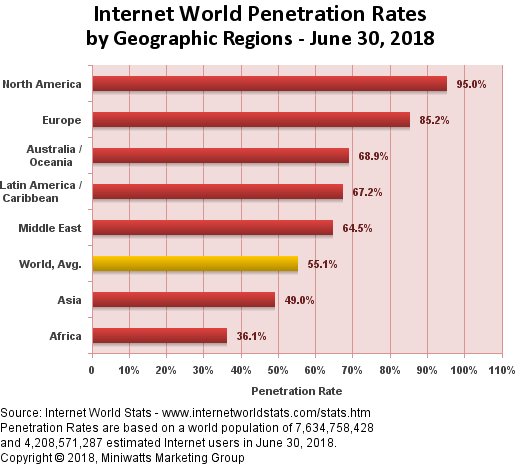
As stats are showing, 95% of the people in North America, and 85.2% in Europe are connected to the Internet. And as the numbers are going down, we are moving through regions like Australia, Latin America, and the Middle East. Even if the number of web users in these regions is not that high, we can expect that to change in the next few years.
In a research made by Internet World Stats on June 30, 2018, they estimated that more than 55% of the people worldwide are connected to the internet.
Now it should obvious how much the security of such a (truly) global network is important.
Internet Security Trends
This year the EU, in an effort to make it easier for its citizens to consume more throughout the quasi-federation, has sanctioned a regulation, that has become famous as GDPR –(abbreviation of General Data Protection Regulation). That act made a major shift in the web and made it so, that more people became concerned about their data, and how it is stored, and used.
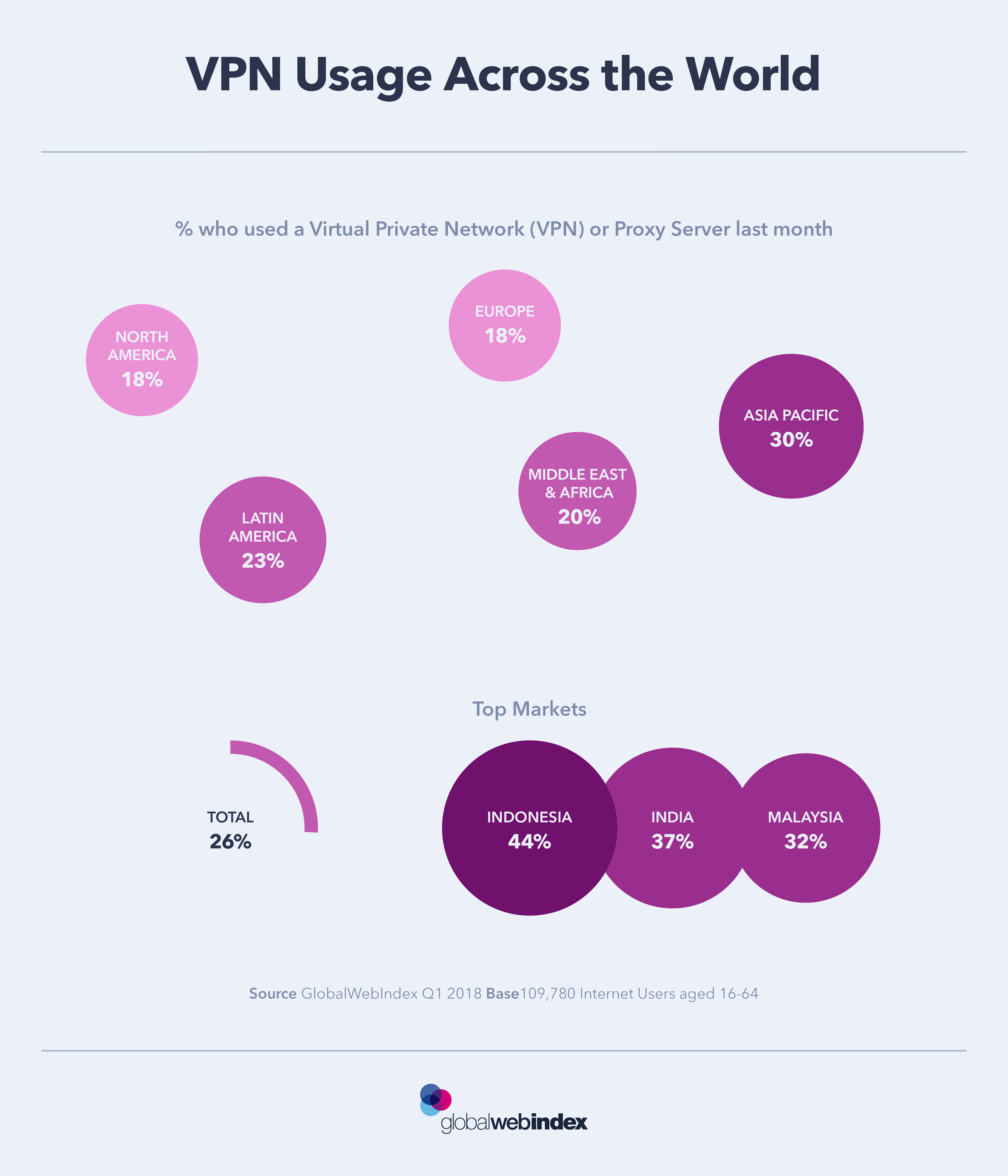
The usage of VPNs has risen. VPN is another abbreviation, which stands for Virtual Private Network. The main goal of such a network is for the user to hide. Thus, it will be harder(not absolutely impossible) for another internet user to define the origin of internet activity.
Another internet security trend is encryption. This is yet another topic, that we’ve talked about, in our article on Internet Security Trends. Still, the most important part is that you’ll better consider taking care of your users’ security, by getting an SSL Certificate. Which we’ll cover a bit later in this article.
Read more: The Google Chrome “Not Secure” Warning: What Does it Mean and How to Fix it?
WordPress Hosting
WordPress is not only the most used CMS worldwide. It is the most attacked one, as well. Of course, that is to be expected. Just there are more websites that are using the CMS, than any other. It is not that WordPress is not secure. Just the opposite. In fact, here are 8 Reasons Why You Should Use WordPress.
But for a website to be secure, you need to choose the right hosting. Thus, an optimized WordPress Hosting is a must, if you want to make your WordPress secure from hackers.
Of course, the chosen hosting is just part of all. There are a number of things that you have to do yourself.
Strong Password
The knowledge of basic economics will naturally lead you to that conclusion. If there are easier ways that pay higher, there will be people that are eager to go against the norm. That is why some people are hurting others, stealing from others, lying, or hacking websites.
And while there are too many ways for a website to be hacked.
According to Wordfence, the two main ways for a WordPress website to be hacked are through a plugin, or through brute force.
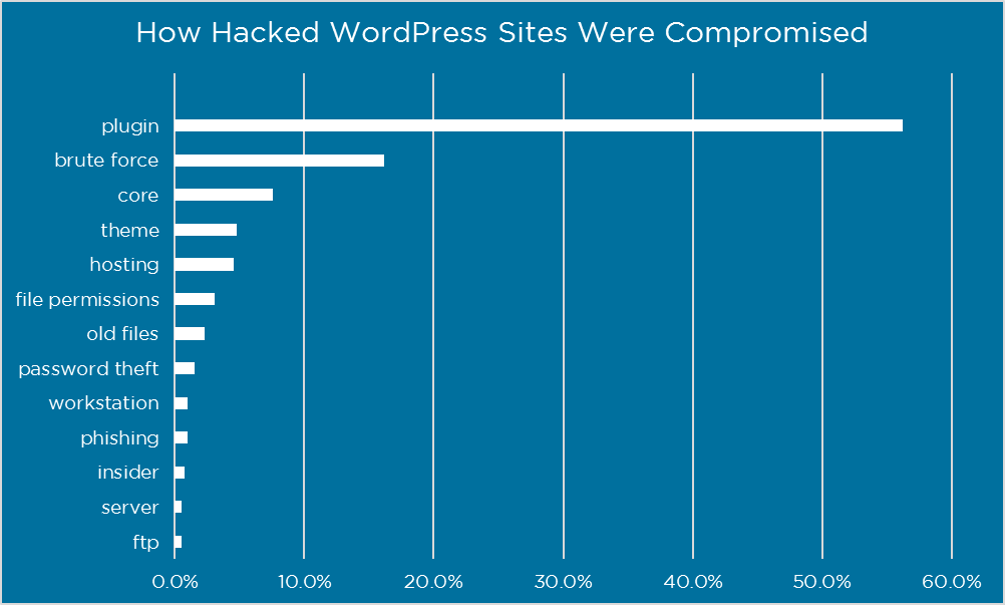
We’ve mentioned in a previous article that a strong password is a must. Yet, when the data is vivid, there is no denial of that claim.
NB! Bruteforce is a password-guessing attack. Such an attack could be prevented by using a strong password. And maybe, changing it regularly. Just make sure that you are able to remember these password changes.
And choosing a strong password is a must, not only when you are trying to secure a WordPress website. You can, and should do that, with all of your profiles. Especially, in the social media and email accounts.
One more thing.
When speaking of WordPress security, as you remember, the plugins are the main risk. Thus, make sure to update them regularly, and if there is a plugin that was not updated in the recent few months, and/or the company that has created it has disappeared from the web… well, maybe you should consider finding а substituent.
SSL Certificate
We’ve mentioned that already, and I promised to get back to the topic. We’ve spoken about SSL in our article about Google Chrome’s not secure warning.
Simply put,
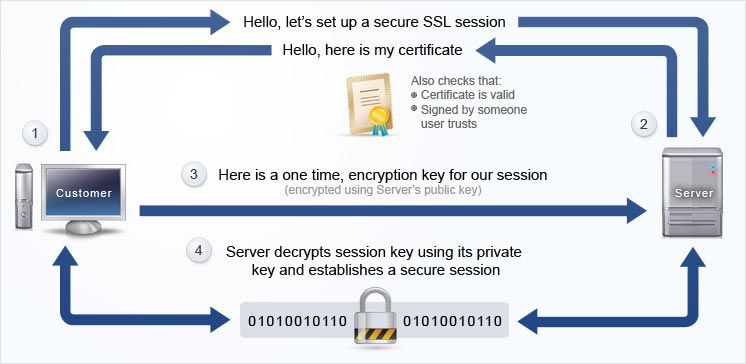
The certificate works by encrypting any data transmitted between the browser and your website before being sent. It is then decrypted after having been received using the 128 or 256-bit key issued exclusively to you.
Trusted authorities such as RapidSSL or GeoTrust issue certificates that are installed to a single hostname.
Even though every website should have an SSL Certificate, you can perceive it as mandatory to have one, in case:
- you operate an online store.
- accept credit cards or other payments.
- offer online services where subscribers go over a signup process.
- your website supports account login.
- when other private data is transmitted over the Internet.
Conclusion
While there are malevolent people online, you can prevent your data or the data of your users to fall into the hands that no one wants them to be. To do that, you need to choose the right hosting, download and install plugins that will make your WordPress secure from hackers, use a strong password, and, of course, get an SSL Certificate(thus, encrypting the information that gets in and out of your website).
Even Facebook and Yahoo became victims of data breaches. Yet, this shouldn’t stop anyone from creating his own website.
Why?
Because you have something to say. And if you decide not to say it, we won’t hear it.
And we want to hear your story.